Monday, 12 October 2015

Tools to Create Web Design Faster


Websites are very essential for companies to advertise online. Without a website, a company may miss out on a lot of business opportunities. Whether it is a small or big company, website will definitely work magic on your overall sales. You can opt for an affordable web design; many companies offer such services and the rates are very competitive.
More and more companies are coming online, and in fact the web designers are getting busier by the day. However, there are some tools designed just for the purpose. These make the job of designing a website much easier.


Adobe Kuler: This is used to find color palettes for your images. This tool helps one identify complimentary colors, by using various color rules. We can thus choose a palette we find appropriate for the project.

Mocking Bird: This tool helps us create website mockups and share them with other online users.

Oto255 : This helps us to choose different variations of a single colour. It is used for graphic and web designing.
CSS Background Maker: This is used to create gradient backgrounds in CSS. It works on Firefox, Chrome, Safari and Internet Explorer 10.

Closure Compiler Service: This helps you compile a bundle of java script files, which go together – at a single go. This also reduces the size of the code and may help enhance page load time.

Know Em Social Media Optimizer: This tool gives one an idea about how their website will look on social media like Facebook, Twitter and Google Plus.

Tweak your Biz Title Generator: This is a very useful tool, given that people pay a lot of attention to a page title. A good title can in fact generate 50% more interest in your website. One just needs to enter the content in order to get appropriate title suggestions.

Photovisi : This helps us create beautiful collages and cute looking shapes. This is helpful when we may feel the need for a side-bar, or perhaps a new website background.

Is my Blog working: This tool helps you to check your server’ status. You can check if your blog is working or not. This is a very useful tool and one may no longer need to be notified by a second person regarding the same.

Yahoo! Smush.it
This is a very useful tool which cuts down the extra file size of a picture. It is a loss less tool and therefore very helpful in optimizing the picture without compromising on the quality.

Initializr
This is a very useful tool; it produces a clean HTML5 template, fully ready for customization. Thus we don’t have to worry about writing the code to start with.

Responsive Test Environment
This helps us in testing purposes; the advantage is that we can choose our own break points.

There are many tools for making low cost web design;  the ones listed above are just the tip of an iceberg. The point we are trying to make is this; creating a website is a must for improving your sales and get more clients. Get one today! For more information contact WebCanny.

Tuesday, 6 October 2015

How to improve Facebook likes


Social media sites such as Facebook has huge potential for brand awareness. It can help to boost SEO of a company  website. It provides opportunities to directly interact, build relationship and make connections with customers. For any business Social Media marketing has become an important part of their marketing division. In this article I have shared about how to increase Facebook likes.


1   Post good content like entertainment, fun, inspirational or educational on social media, if its good people will like and share it.

     Get more friends on your friend list, the people you have in your network, the more people will see your post and engage with it.

        Make a blog page on your own site and put social sharing buttons, It will help you to get more likes.

     Regularly share your post among your friends

     Join Facebook groups and actively participate in group posting

     Invite your friends, colleagues  and families to like your Facebook page.

    Add a like box to your website you can get the like box code on developers.facebook.com. This
     Feature  is very important as people can directly your Facebook business page.

    You can also use paid Facebook ads to increase likes for your business page. Your ads will be shown to the people whom you have targeted based upon location & Demography.

     BuildYour own community and fan base by creating a Facebook group.

      Get  he right time to post your content by doing A/B testing by posting at various time intervals.


Saturday, 3 October 2015

How to use RSS & Feedburner


Why to use Feeedburner


Feedburner is a google product that is used by blogs and websites to keep tracks of people who subscribe to your blog using RSS, from which browser and country they came, and it has many tools and functionalities to help you share your blog content like email subscribe option.

What is RSS Feeds


 Before learning about Feedburner one has learn about RSS feed. It means really simple site syndication, it really simplifies the web experience it extracts news from your favourite sites and puts then together in a feed reader, so that user can access in one application. Let me explain it to you, there are many news websites on the internet, but people might not be interested in reading all the news in different categories, some might be interested in sports news, some in politics while some in entertainment news. This is where RSS comes into play, in it people can only subscribe to those categories which interests them, suppose I like technology blogs, so in this case I visit the news site and subscribe to technology news and then I start getting technology related news in my feed reader. So in this way I save a lot of time as you don’t have to visit each website regularly and only receive relevant news in our news feed related to  our interests. In RSS users can subscribe to your blog and read content via email or by using any web application like feed readers.   You know Feedburner has lots of great features that every blogger should be using in order to optimize and track their blog posts.
The presence of an orange symbol indicates that a site uses a feed reader and you can subscribe it using any feed reader like Feedly.

How to Use Feedburner for Blogs


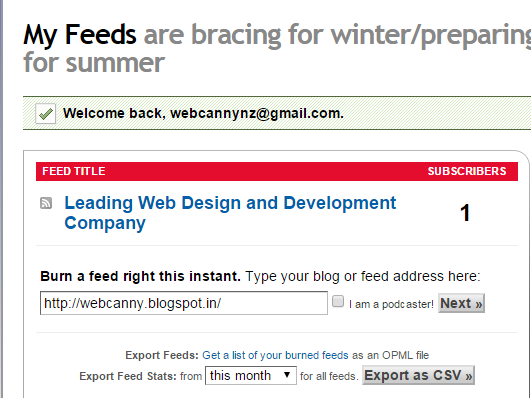
Step1- Go to feedburner.google.com  and sign up with a gmail account

Step2- Paste your blog URL in window and click next


Step3- In next page put your title and the address URL where people can find your news feed.


Step4- Click next button and its all done you have now created a Feedburner for your blog.

Many Ecommerce website design company also have blogs which can be used with RRS and Feedburner to help you reach more people.