Showing posts with label SEO strategy. Show all posts

Tuesday, 10 May 2016

Differences between Web Copy and Web Content


A lot has been spoken about website content and its significance. Everybody knows that web content plays an important role in search engine optimization. So what is the difference between web-content and web-copy? Are they one and the same?

Website content plays an important role in keeping the visitors engaged on the site or making sure that they don’t bounce off it and go away.
However, if you run a search in Google to tune of “I need writer for my website”, you will obviously get a list consisting of writer categories like web writer / copy-writer and website content writers. So before you get confused regarding whom to hire let’s explain a little bit about the content you will need for your website.

Web Copy

I’m sure most of the companies have a website for a reason and that is to be visible to a larger audience. They also intend to educate viewers about their products and services. In order to achieve it, their website must convey the relevant information in a professional way.
A web copy is the skeletal structure of the website. It helps the visitor learn more about the company and its products in a systematic way. The aim is to speak more about the company on the web. So, that is the role of a web copy writer or copy writer.

Web Content

While a web copy is written with one aim in mind, and that is to ‘sell’; a website can also have a blog which will contain a wealth of useful information. This is classified as ‘web content’. A website needs to have fresh content updated on it, everyday. That will give it a higher rank in Google search. A website can also market itself by establishing itself as a source of knowledge in its respective field. A content writer is hired to write web content, which is interesting and informative. When you write great content, obviously it will be shared across of the social media; it has the potential to go viral. A web content writer can also post articles on other high ranking article submission websites, with back-links to your site. This again helps in Search Engine Optimization (SEO) of the website.
Thus we understand that a while a Web Copy writer aims to sell the business products and services, while a Web Content writer helps get customers in the right place. One may thus hire the right person for the job according to requirement. For more information on affordable website design and content marketing, contact WebCanny

Friday, 16 October 2015

Tips for Building Mobile Friendly Websites


The number of smart phone users around the world will cross the 2 billion mark by 2016. People will make use of their smart phones not only for calling and texting, but also for browsing the web for news, information, and even shopping. It is imperative that businesses must make their websites mobile-friendly or they may lose out on potential customers.

Use Good Framework for Responsive Site

You can use bootstrap for the same. Here the website’s elements are arranged in the form of a grid. The grid shifts and adjusts itself according to the display device like tab or smartphone. Thus the website elements are spaced appropriately to look good on a desktops, laptops, tabs as well as smart phones.
One more advantage of bootstrap is that it is free, open source and properly documented. It also applies a unified approach to web development and you have the same user experience, whether you access the site from a mobile or desktop; and what’s more is that you don’t require a separate URL for the mobile website.

Navigation must be Easy

When the website design is optimized for mobile usage, it must be navigable by the thumb. One shouldn’t feel the need pinch it to make things readable. Even if the site is mobile friendly, sometimes we find that the navigation buttons are very small and the wrong button will get pressed. The average width of a finger is 15mm or 45 pixels and therefore, the button’s selection area must be created accordingly.

Simplicity in Design

When you are optimizing a website for mobile usage, you must make sure that it loads fast. The website must not contain high quality video or images. The images must be optimized to facilitate faster loading time and a better user experience. Replace the heavy Java Script libraries like mobile jQuery with standalone JavaScript.

Content must be Concise

The user may be accessing the site via a mobile phone and obviously the mobile screen is much smaller. He may not have the time to scroll down and keep reading your website content forever. So keep it short and sweet.

Use Icons

Instead of explaining it in a dozen words, say it by mobile icons. The user will find it easier to just tap the call or email icon, rather than mentioning the same in words in your contact page.

Limit the JavaScript

Do not use excess JavaScript as mobiles may behave differently. It doesn’t mean that one mustn’t use it, but utilize it cleverly enough so that the speed of the mobile site doesn’t get affected.

Access to Basic Information

Make the basic information available to the user. For E.g. if you are a restaurant chain, people will be looking for your nearest branch address, map, contact and home delivery number. So, place your information accordingly.

User Friendly Forms

The forms must not ask for extensive information. They must just ask for a person’s basic information like name and email; the rest can be obtained in future correspondences.

Extensive Testing

The website must be tested extensively on different devices and browsers for making sure that the user experience is good. SolidifyApp, delight.io are some useful tools.
For affordable website design services,  contact WebCanny.


Saturday, 3 October 2015

How to use RSS & Feedburner


Why to use Feeedburner


Feedburner is a google product that is used by blogs and websites to keep tracks of people who subscribe to your blog using RSS, from which browser and country they came, and it has many tools and functionalities to help you share your blog content like email subscribe option.

What is RSS Feeds


 Before learning about Feedburner one has learn about RSS feed. It means really simple site syndication, it really simplifies the web experience it extracts news from your favourite sites and puts then together in a feed reader, so that user can access in one application. Let me explain it to you, there are many news websites on the internet, but people might not be interested in reading all the news in different categories, some might be interested in sports news, some in politics while some in entertainment news. This is where RSS comes into play, in it people can only subscribe to those categories which interests them, suppose I like technology blogs, so in this case I visit the news site and subscribe to technology news and then I start getting technology related news in my feed reader. So in this way I save a lot of time as you don’t have to visit each website regularly and only receive relevant news in our news feed related to  our interests. In RSS users can subscribe to your blog and read content via email or by using any web application like feed readers.   You know Feedburner has lots of great features that every blogger should be using in order to optimize and track their blog posts.
The presence of an orange symbol indicates that a site uses a feed reader and you can subscribe it using any feed reader like Feedly.

How to Use Feedburner for Blogs


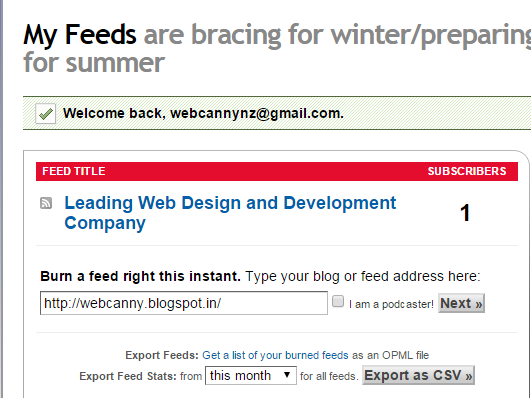
Step1- Go to feedburner.google.com  and sign up with a gmail account

Step2- Paste your blog URL in window and click next


Step3- In next page put your title and the address URL where people can find your news feed.


Step4- Click next button and its all done you have now created a Feedburner for your blog.

Many Ecommerce website design company also have blogs which can be used with RRS and Feedburner to help you reach more people.


Sunday, 14 June 2015

WebCanny Video Launched :Leading Web Design and Development Company

By Choosing WebCanny, you are opting to partner with one of Australia's and New Zealand’s leading Web Design and Development Company. Since beginning operations in May 2009, we’ve had explosive growth in New Zealand, with over 3000 small to mid size businesses on board for their web design, hosting and emails with proven expertise and reliability.

Thursday, 11 June 2015

Digital Marketing Strategies

Digital Marketing is an essential marketing strategy for any business to stay ahead of competition. With increasing mobile internet users, the potential customers are constantly online. Having said this, digital marketing gives you an edge over your competitors to grow your business online.

Here is a list of digital marketing strategies that a business owner can implement to help their business grow.

Digital Marketing Strategy #1: Every Business should have Website

“Website Requirement Analysis” is a process that assists in analyzing challenges and opportunities with respect to the business model of the website.

Digital marketing Strategy #2: Search Engine Optimization

Search engine optimization (SEO) is the process to improve the visibility of a website or a web page in a search engines in "organic" results.

Digital marketing Strategy #3: Search Engine Advertising

Search Advertising is a method of placing online advertisements on web pages that show results from search engine queries

Digital marketing Strategy #4: Social Media Networking

Social media optimization (SMO) is the use of a number of social media outlets and communities to generate publicity to increase the awareness of a product, brand or event.

Digital marketing Strategy #5: Email Marketing

Email marketing is directly marketing a commercial message to a group of people using email. In its broadest sense, every email sent to a potential or current customer could be considered email marketing.

Digital Marketing Strategy #6: Blogging

A blog is a discussion or informational site published on the World Wide Web. Blogging is an interactive form of publishing content on the web.

These strategies when implemented on your website will definitely make a difference. Try this and see your business grow!

Monday, 1 June 2015

How to Globalise a Website and Business?

Website globalisation is trying to reach company’s global efficiency by making the website in multilingual. This is also known as website translation. In today’s world website globalisation is a requirement. This will help your products to reach to most of the countries across the world and this helps in business expansion.
Market Analysis – First a thorough study about the market or the target customer is required, as per the geographic, culture, economy and attitude of the visitors for targeting the exact market :
Keyword Research – Research Structure of the website- Use the best structure for easy and stress free navigation and access of the website.
Effective Content- Use the relevant content for the website by analysing visitor’s behavior.
Translate the content as per the requirement- Use tools for translating the text content as per the visitor’s requirement. This will increase the traffic and usability of the particular website.
Optimise the content – We can optimise the content and images by applying the key words in the way of search engine guidelines


One of the main benefits of having an eCommerce Website is the fact that your products and services are available worldwide.
However to make sure that you can turn this multinational traffic into conversions you will need to accommodate them. i.e, your website should operate on a operating on a multi-channel level. This means your website has to be localized. What we mean by localizing is, translating the content on the website to local language. It’s just not about the language, it is about the target audience, the culture and the market comparision.
Last but definitely not the least, to go about Global Expansion, you require a good Customer service and a team that speaks native language.

Sunday, 12 April 2015

WebCanny : Main factors to be checked before launching a website

WebCanny maintains professionalism in each and every step of web design process. Our specialists here will test the website design, functionalities and the outlined points mentioned below will be considered:

1. Web Analytics to Track Visitors
2. Testing Contact Forms
3. Removing Spell Check
4. Removing Broken Links
5. Meta Tags
6. Set up a 404 Page
7. Avoiding Code Error
8. Setting up 301 Redirect
9. Page Titles
10. URL Structure
11. Site Map
12. Social Media Icons
13. Robots.txt
14. Fav Icon
15. Copyright
16. Privacy Policy

Monday, 30 March 2015

Benefits of Mobile Friendly Websites

Your website is the most important marketing tool. Technology changes quickly. It is important to make the website up to date with these changes.
Your website may not be Mobile friendly:
Mobile internet use is increasing rapidly and optimising your website for a Smartphone or tablet is critical to your website being seen. A mobile website can be accessed anywhere, any time. This level of constant connectivity provides an exceptional opportunity to connect with your customers.
To improve usability for customers and to keep it up to date
Keeping it up to date with the technology and making the website user friendly, so your visitors don’t opt out of the website.
If the content management system or a particular functionality implemented on the website may not be that easy to use for the customers . If the website is redesigned regularly, the customer experience will be good and this inturn increases your visitors and potential customers

Tuesday, 17 March 2015

WebCanny, Australia and New Zealand's Leading Web Design and Development Company offers the best value, professionally designed, SEO friendly websites.

WebCanny, you are opting to partner with one of Australia’s leading Web Design and Development Companies. Since beginning operations in May 2009, we’ve had explosive growth in Australia, with over 3000 small to mid size businesses on board for their web design, hosting and emails with proven expertise and reliability.
We help our clients to expand their business and online presence using SEO friendly websites and an easy-to-use CMS. However don’t just take our word for it, please take a look around our website and see for yourself. You’ll find everything you need to quickly and efficiently, and most importantly, economically design a visually stunning website that will get results for your business. Most people start on the testimonials page: www.webcanny.com.au/testimonials

Wednesday, 21 January 2015

WebCanny : Benefits of Responsive Website Design


As we are all aware, the amount of people using their mobile devices and tablets to browse the internet is increasing daily. From checking their emails, browsing social media to shopping, Smartphone and Tablet have taken over laptops or desktops. Statistics reveal that 60% of the internet usage is mostly Mobile.

Responsive design websites will be optimised for different types of devices, screens and resolutions. On any device, the website navigation is simple and easy.

Google Recommends Responsive Websites
A responsive website allows search engines such as Google to crawl and index content on one URL. Instead of optimizing the desktop and mobile website for SEO, and driving traffic for both, SEO can be performed effectively on one URL for responsive sites.

User Experience
Responsive web design is more about creating the best possible experience for users irrespective of the device being used to access internet. The website will have a lower bounce rate.
Content plays a vital role for a successful SEO strategy. Sharing information/content on website through social media is very easy if it is a responsive design. This in turn increases traffic and online visibility.

Increases Sales
Responsive website makes it easier for users to navigate across the website. Due to the improved experience, the conversion rate will be good and thus the sales.

It is definitely beneficial to have a responsive website as this increases the online visibility, saves time and money and most importantly increases sales.